top of page


HOW TO PAY FOR THE SERVICE
Choose the appropriate service and click ``book``

Fill in the required fields and if you want to pay online, select ``pay now`` and click ``book``.
NB! Make sure you have selected the correct country before the phone number if you do not use an area code. Be sure to read and agree to the Terms of Service, Privacy Policy and Terms of Sale and confirm that you are at least 18 years old.

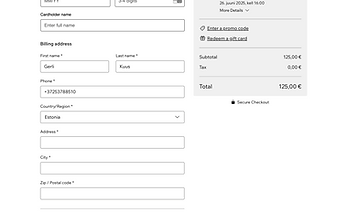
In the opened window, it is necessary to fill in the following fields:
- Card number - bank card number (you can find it on the bank card);
- Expiration date - bank card validity period (you can find it on the bank card, the numbers are separated by a slash, e.g. 09/25);
- CVV/CVC - a three-digit number, usually on the back of a bank card; '
- Cardholder name - name of the bank card holder;
- First name and last name;
- Phone - phone number with area code;
- Country/Region - you must select ``Estonia``;
- Address - address;
- City - city;
- Zip/postal code - postal code.
Then select ``place order and pay``.
Select a suitable date and click ``next``

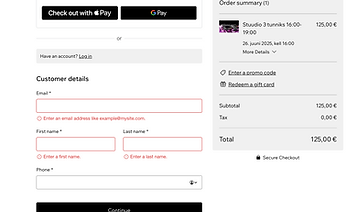
To pay with Apple Pay or Google Pay, select the appropriate option from the Express Checkout menu. If you want to pay with card details, simply click ``continue``.
Depending on your bank card settings, the system sometimes gives you the option to confirm the payment with a smart-id, a verification code, or another method. You will see them on the screen.

bottom of page